
pagerank on a graph#
Licence CC BY-NC-ND, Thierry Parmentelat
grab the zip for starters
what is pagerank ?#
pagerank is a graph metric made famous by Google, who has been using it - at its beginning - to sort pages found in an Internet search, so as to show most relevant pages first.
we consider in a valued and directed graph; that is to say
directed: the fact that \(a \rightarrow b\) does not imply \(b \rightarrow a\)
valued: each edge in the graph has an integer value attached to it (think of it as a distance, or anything else relevant in your application context)
for such graphs, pagerank aims at describing something akin “popularity” for each vertex
there are two variant definitions for pagerank:
no damping
the original (no damping) model roughly goes as follows
all vertices (pages in the case of the Web) have an equal likelihood to be your starting point
at each step, you consider the outgoing links, and randomly pick one as your next step, with relative probabilities based on the outgoing weights
that is to say, if for instance your current vertex has three outgoing links, with weighs 20, 40 and 60, then the first neighbor has 1/6 likelihood to be the next one, and second and third neighbors have 1/3 and 1/2 respectively; you get the gist
pagerank is then defined on each vertex as the relative number of times that you’ll have visited that vertex after an infinite random walk that follows those rules
with damping
the above model has a flaw, as it does not account for people actually restarting from scratch their path in the web; for that reason, in practice the following refined model (with damping) is more widely used
like before, all vertices have an equal likelihood to be your starting point
at each step, you would either
with a 0.15 probability, restart from a randomly picked vertex (with an equal likelihood)
or otherwise pick your next vertex, like in the original model, using outgoing weight relative probability
in this example, we used a standard damping factor value of 85% (usually named \(d\))
overview#
we are going to compute this measure on a graph
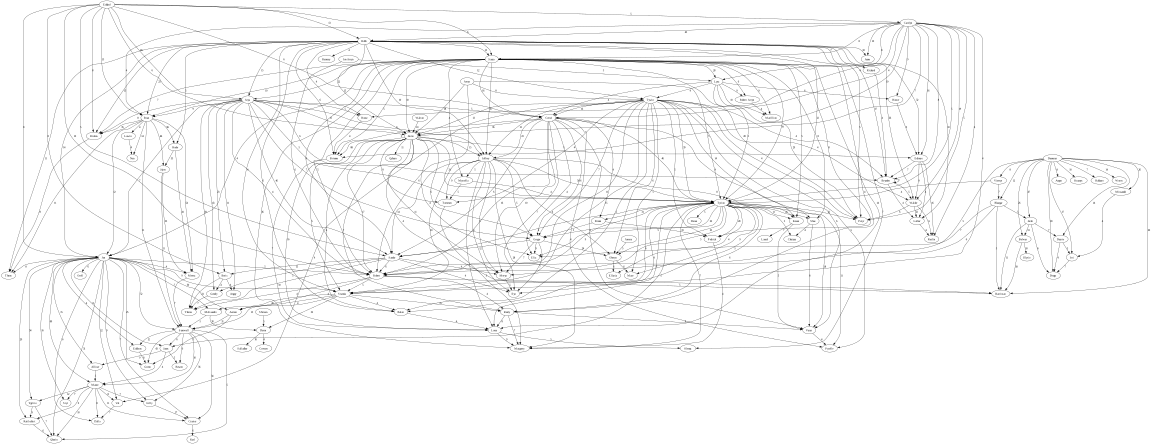
in order to keep things simple, instead of dealing with web pages, we will use a dataset that describes the graph of weighed relationships between characters in a novel related to the famous Game of Thrones saga;
but since a graph is a graph, we can apply the same algorithm to this one, and give each character a rank, that may be perceived as some sort of popularity
so in a nutshell we need to
build a graph in memory,
and use this to simulate the logic of the random walk described above;
theory has proven that the measure should converge to a stable value, provided that simulation is long enough, and we will verify this experimentally.
the steps#
here are the steps that we will take to this end :
aquisition
get raw data over
http, it is located here
https://raw.githubusercontent.com/pupimvictor/NetworkOfThrones/master/stormofswords.csv
parsing
understand what this data represents
design a data structure that can capture this information in a way that is convenient for the simulation that we want to run on the graph
write code to build that data structure from the raw data obtained during first step
simulation
pagerank can be computed by linear algebraic methods - using a stochastic matrix to model the relative likelyhood to go to vertex \(j\) knowning you’re on \(i\)
however in this exercise we want to do a simulation, so once this graph is ready, we can write a simulation tool that walks the graph randomly following the rules of the game explained above
observation
running the simulation several times with different lifespans - ranging from several hops to a few thousands -
we can experimentally check if we indeed obtain consistent results, i.e. constant results for all characters
hints#
for step acquisition#
loading a csv as a pandas dataframe is a one-liner when using pandas.read_csv
once you have a dataframe you will need to iterate on its rows
this can be done like so (image the dataframe has columns LastName and FirstName)for i, line in df.iterrows(): print(f"line number {i}, {line.FirstName} {line.LastName}")
for parsing#
the crucial part here is to imagine a data structure that depicts the graph;
we will need to model ‘vertices’ in the graph in a way that can be easily walked.
many data structures can do the job, and for starters our suggestion here is to use a dictionary of dictionaries; like in the following example
test graph:
   'A'   -- 10 ->  'B'
   'A'   -- 20 ->  'C'
   'B'   -- 30 ->  'C'
   'B'   -- 40 ->  'D'
   'D'   -- 20 ->  'A'
would then be represented by a dictionary that looks like this
graph = {'A': {'B': 10, 'C': 20},
         'B': {'C': 30, 'D': 40},
         'C': {},
         'D': {'A': 20}}
so to put it another way :
our graph’s keys are the graph’s vertices
the value attached (in the dictionary sense) to a vertex represents the outgoing links of that vertex
so, because there is a link weighed 20 going from ‘D’ to ‘A’, we have
graph['D']['A'] == 20
True
what about sink nodes ?
a sink node is a node without any successor - like C in the above graph
in other words, it may be reached from the graph, but once in that node there is no way out
you need to make decision regarding sink nodes:
either you decide that they do not appear at all as keys in the dictionary
or you decide that they do appear in the graph, with an empty dict as value
each choice has its pros and cons; imho the latter is best, but that’s a matter of taste
for simulating#
of course you will need to use the ramdom module, and in particular random.choices() and similar tools, to pick in a list of choices.
one way to think about this problem is to create a class RandomWalker:
initialization (
__init__method)we create an instance of
RandomWalkerfrom a graph-dictionary and a damping factorwe also want to model the current vertex, so a
currentinstance attribute comes in handy
initialization (continued) -
init_random()methodthis is optional, but in order to speed up simulation, we may want to prepare data structures that are ready for that purpose; in particular, each time we run a simulation step (move the current vertex), we want to randomly pick the next vertex with relative probabilities, in line with the outgoing weighs
as a suggestion, these data structures could be (a) a list of all vertices in the graph, so that one can be picked randomly using
random.choice()and (b) a dictionary of similar structures for each vertex when it comes to picking a neigh bour
pick a start vertex -
pick_start_vertex()methodreturns a starting vertex with a uniform probability
pick a neighbour vertex -
pick_neighbor_vertex()methodfrom the current vertex, return a neighbour picked randomly with the probabilities defined by their outgoing weighs.
simulate the graph for some number of steps -
walk()methodfrom all the above, it is easy to write the simulation
result is a dictionary with vertices as key, and as value the number of steps spent in that vertex during the simulation
hints (2) - for quick / advanced users#
in practice, this idea of using a dictionary is simple to write, but performs rather poorly on very large graphs
it is possible to speed things up considerably by using numpy arrays instead, given that upon reading the data we know the size of the graph in terms of both vertices and edges
advanced users who were able to carry out the exercise quickly could consider rewriting it using this new angle
this radically different approach requires more care, but can then be drastically optimized using compilation tools like numba
YOUR CODE#
data acquisition#
URL = "https://raw.githubusercontent.com/pupimvictor/NetworkOfThrones/master/stormofswords.csv"
# your code here
# insert new cells with Alt-Enter
parsing#
# your code here
simulation#
import random

class PageRankWalker:


    def __init__(self, graph, damping=0.85):
        self.graph = graph
        self.damping = damping
        # the vertex we are on
        self.current = None
        self.init_random()


    def init_random(self):
        """
        initialize whatever data structures
        you think can speed up simulation
        """
        ...


    def pick_start_vertex(self):
        """
        randomly picks a start vertex
        with equal choices
        """
        ...


    def pick_next_vertex(self):
        """
        randomly picks a successor from current vertex
        using the weights
        """
        ...


    def walk(self, nb_steps):
        """
        simulates that number of steps
        result is a dictionary with
        - vertices as key,
        - and as value number of steps spent in that vertex
        """
        ...
running it#
if you’ve followed our interface, you can use the following code as-is
# create a walker object from the graph obtained above

walker = PageRankWalker(G)
---------------------------------------------------------------------------
NameError                                 Traceback (most recent call last)
Cell In[7], line 3
      1 # create a walker object from the graph obtained above
----> 3 walker = PageRankWalker(G)

NameError: name 'G' is not defined
STEPS = 1000

frequencies = walker.walk(STEPS)
# the sum of all values should be STEPS
raincheck = sum(frequencies.values())
raincheck == STEPS
raincheck, STEPS
# dicts are not so good at sorting
# let's use a list instead

tuples = list(frequencies.items())
tuples.sort(key = lambda tupl: tupl[1], reverse=True)

# top 4 in the graph
tuples[:4]
note on lambda
for those are not familiar with the lambda construct:
it is an expression that allows to create a function object on the fly
in other words, these 2 cells are equivalent
# the lambda expression creates a function object
# that we pass as an argument to the `sort` method

tuples.sort(key = lambda tupl: tupl[1], reverse=True)
# we could instead have created that function object
# in a more usual way like this, it is equivalent, but longer

def the_count_part(tupl):
    return tupl[1]

tuples.sort(key = the_count_part, reverse=True)
going a little further#
make it reproducible#
for starters we’ll wrap all these steps into a single function:
def monte_carlo(url_or_filename, steps, damping=0.85):
    """
    run a simulation over that number of steps
    """
    df = pd.read_csv(url_or_filename)
    graph = build_graph(df)
    walker = PageRankWalker(graph, damping)
    # simulate
    frequencies = walker.walk(steps)
    # retrieve result
    tuples = list(frequencies.items())
    # sort on highest occurrences first
    tuples.sort(key = lambda tupl: tupl[1], reverse=True)
    # display top 5
    for character, count in tuples[:5]:
        print(f"{character} was visited {count} times i.e. {count/steps:02%}")
# show top winners with a 1000-steps simu
for _ in range(5):
    print(f"{40*'-'}")
    monte_carlo(URL, 1000)
# same with a tenfold simulation
for _ in range(5):
    print(f"{40*'-'}")
    monte_carlo(URL, 10000)
your conclusion …#
visualization (optional)#
finally, we can use the graphviz library to visualize the raw graph
installing dependencies is a 2-step process
the binary tool; for that
linux: be aware that most common linux distros do support graphviz, so you can install them with either
dnforapt-get;MacOS: likewise, you can install it with
brewAll: including Windows: see the project’s page;
the Python wrapper that you can install with (surprise !)
pip install graphviz
# DiGraph stands for Directed Graph
# that's what we need since our graph is directed indeed

from graphviz import Digraph
gv = Digraph('Characters of the Thrones', filename='thrones-graphviz')

for source, weighted_dict in G.items():
    for target, weight in weighted_dict.items():
        gv.edge(source, target, label=f"{weight}")
gv.attr(rankdir='TB', size='12')
gv
# save as svg
# https://graphviz.readthedocs.io/en/stable/formats.html#formats

gv.format = 'svg'
gv.render()