
character encodings#
ASCII#
ord() and chr()#
# a text like this one

text1 = "abcd\nefgh\n"
is actually encoded in memory according to ASCII:
https://www.man7.org/linux/man-pages/man7/ascii.7.html
# and to confirm that, we can use ord()
# which applies on a single char (raises an exception otherwise)

for c in text1:
    print(f"{c} -> {ord(c)}")
a -> 97
b -> 98
c -> 99
d -> 100

 -> 10
e -> 101
f -> 102
g -> 103
h -> 104

 -> 10
# FYI, note we also have the reverse function, pour info, qu'on a aussi la fonction inverse de ord
# qui s'appelle chr()

chr(97)
'a'
write into a text file#
specify an encoding ?
in 2024 you should not need to be explicit about the encodings if your computer is properly configured (i.e. not too old ;-)
but here we want to be robust, and so we are explicit about that
from pathlib import Path
# remember to always use a with: when dealing with files

with Path('encodings1-utf8').open('w', encoding='UTF-8') as f:
    f.write(text1)
inspect that file with a hex editor - e.g. you can use vs-code and install the HEX Editor extension
you will see that, with ASCII-only characters, your file has exactly one byte per character
non-ASCII & UTF-8#
let us now consider a text with French accents and cedilla - any non-ASCII character would do
text2 = "abçd\néfgh\n"
inspection#
# notice the values > 127
# which are not supported in ASCII

for c in text2:
    print(f"{c} -> {ord(c)}")
a -> 97
b -> 98
ç -> 231
d -> 100

 -> 10
é -> 233
f -> 102
g -> 103
h -> 104

 -> 10
# focus on the 2 characters whose encoding is > 127

hex(231), hex(233)
('0xe7', '0xe9')
bin(231), bin(233)
('0b11100111', '0b11101001')
again, note that chr() and ord() are the inverse of one another
chr(231), ord('ç')
('ç', 231)
write into a text file#
with Path('encodings2-utf8').open('w', encoding='UTF-8') as f:
    f.write(text2)
read back#
specify an encoding (2) ?
in the following, we want to read bytes (note mode=rb) and b stands for binary
this means we will do the decoding ourselves !
and so this time we do not specify an encoding (would raise an exception…)
# no encoding in binary mode, would make no sense !

with Path('encodings2-utf8').open('rb') as f:
    raw = f.read()
and as we read bytes here, and we have more bytes than the initial text had characters
len(raw), len(text2)
(12, 10)
it adds up, since the each of the 2 alien characters will need 2 bytes each to be encoded
(European characters usually take 2 bytes; some more exoctic chars can take 3 or 4 bytes)
UTF-8 logic#
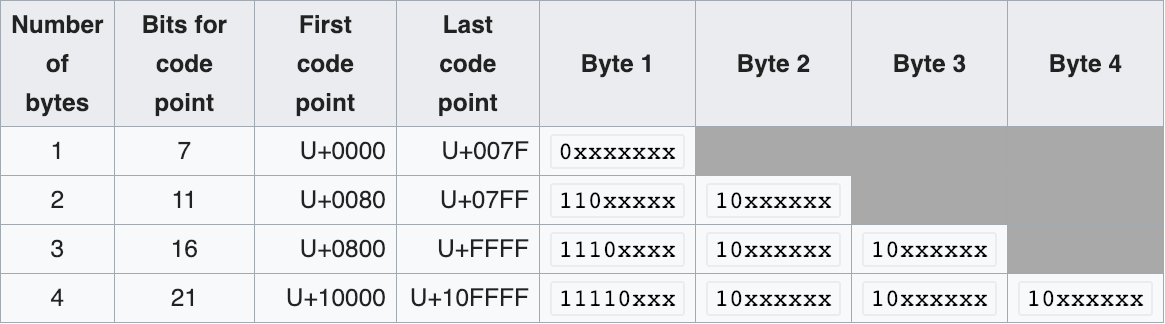
this table describes how the UTF8 encoding works:
a visual example#
on a sample 4-characters string: été\n
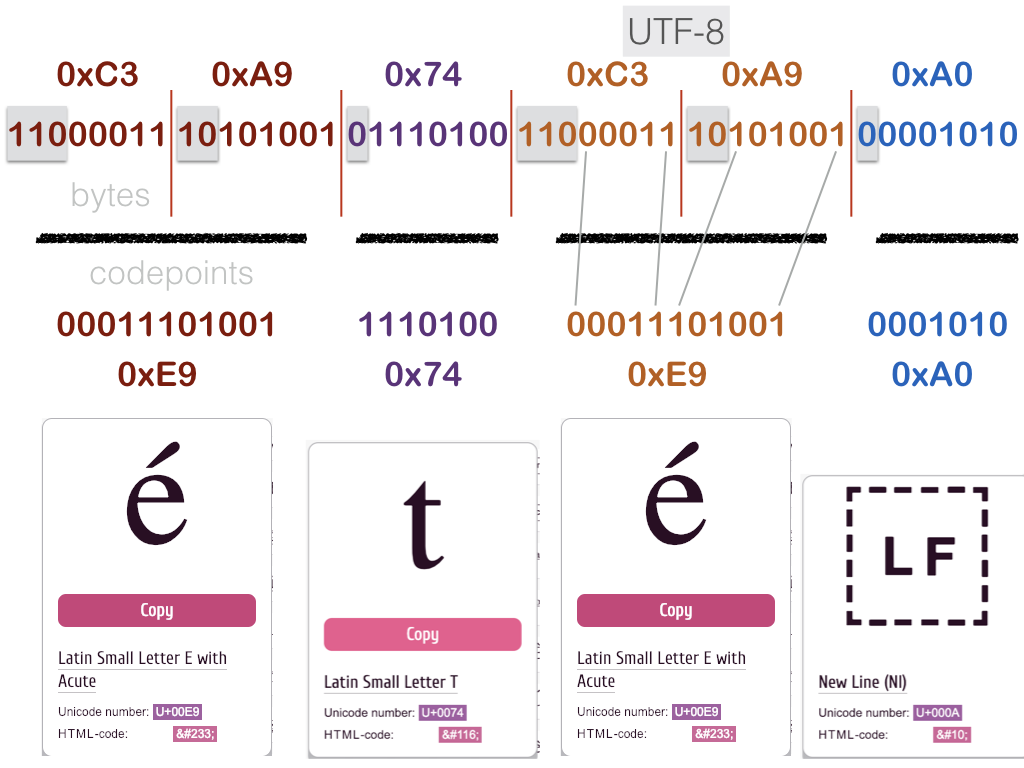
let’s check that
on our own data#
# here is it again
raw
b'ab\xc3\xa7d\n\xc3\xa9fgh\n'
let us number the contents of raw
012   3   45 6   7   89
ab\xc3\xa7d\n\xc3\xa9fgh\n
# extract the 2-bytes areas for each alien character

ccedilla = raw[2:4]
eaccent = raw[6:8]
for b in ccedilla:
    print(f"byte {b} {hex(b)} {bin(b)}")
byte 195 0xc3 0b11000011
byte 167 0xa7 0b10100111
for b in eaccent:
    print(f"byte {b} {hex(b)} {bin(b)}")
byte 195 0xc3 0b11000011
byte 169 0xa9 0b10101001
sounds good
decode manually (gory details)#
this is totally optional of course, but if we wanted to do the decoding ourselves…
(you may skip to the next section)
# we want 5 bits from the first byte and 6 from the second byte

on2bytes_0_len = 5
on2bytes_1_len = 6

# and that's what should occur in the remaining (left-hand-side) bits
on2bytes_0_pad = 0b110
on2bytes_1_pad = 0b10
def mask_from_len(length):
    """
    for e.g. len == 5, we compute a mask that has
    3 bits set and 5 bits unset (because 3+5=8)
    """
    return 2**8 - 2**length
# let us check that it works as advertised:

# e.g. for byte0
# the result allows to separate
# the (3-bits) padding from
# the (5-bits) payload

bin(mask_from_len(5))
'0b11100000'
# with that we can manually decode 2-bytes UTF-8 !

on2bytes_0_mask = mask_from_len(on2bytes_0_len)
on2bytes_1_mask = mask_from_len(on2bytes_1_len)

def decode(on2bytes):
    b0, b1 = on2bytes
    # check masks
    # e.g. check that the 3 high bits in 0xc9 are indeed 0b110
    assert (b0 & on2bytes_0_mask) >> on2bytes_0_len == on2bytes_0_pad
    # same on byte 1
    assert (b1 & on2bytes_1_mask) >> on2bytes_1_len == on2bytes_1_pad
    # extract meaningful bits
    # for that we just need to invert the mask
    bits0 = b0 & ~ (on2bytes_0_mask)
    bits1 = b1 & ~ (on2bytes_1_mask)
    # asemble bits into codepoint
    # b0 has the high bits so it needs to be shifted
    # by the number of meaningful bits in byte1
    codepoint = bits1 | bits0 << on2bytes_1_len
    return chr(codepoint)
# and indeed
decode(eaccent), decode(ccedilla)
('é', 'ç')
exercise#
use this table to write a complete UTF-8 decoder
UTF-32#
let us now take a quick look at the UTF-32 encoding
this is a fixed size encoding, meaning each character will use 4 bytes
this is convenient e.g. when you need to do direct access to the \(n-th\) character in a file
write with UTF-32#
let’s write our text with 2 alien characters in a second file
with Path("encodings2-utf32").open('w', encoding='utf-32') as f:
    f.write(text2)
size and BOM#
however the total file size is not exactly \(4*n\), and this is due to something called the BOM (Byte Order Mark)
# computing file size: use pathlib !

p = Path("encodings2-utf32")
print(f"file has {p.stat().st_size} bytes")
file has 44 bytes
len(text2)
10
44 is because
4 * 10 chars = 40 bytes
plus 4 bytes for the BOM located in the first 4 bytes
# read the 4 first bytes

with Path("encodings2-utf32").open('rb') as f:
    bom = f.read(4)
bom
b'\xff\xfe\x00\x00'
which indeed matches the UTF-32 little-endian (LE) BOM as shown on https://en.wikipedia.org/wiki/Byte_order_mark
decoding is way easier#
with that in mind, it is easier to
compute the location of a given character from its rank in the string
and to decode the raw binary stream
for example: decode the ç in our initial string
# read the whole file

with Path("encodings2-utf32").open('rb') as f:
    raw = f.read()
# remember that ç is at index 2

index = 2

text2[index]
'ç'
so this means it gets encoded in the file on 4 bytes starting at offset
4 + 4 * index
offset = 4 + 4*index

b4 = raw[offset:offset+4]

b4
b'\xe7\x00\x00\x00'
because it is little endian - see https://en.wikipedia.org/wiki/Endianness - it means we have to mirror the data bytes to get the actual value
# int.from_bytes knowns how to transform a sequence
# of bytes into an int, given the endian-ness

int.from_bytes(b4, 'little')
231
# and indeed, that is what was encoded in the file !

chr(231)
'ç'